NEXT-GEN OPTIMAL VOICE ASSISTANT
(N.O.V.A.)
An ultra-fast, multi-brain desktop AI assistant powered by 3 Cognitive Pillars (Self-Healing Code Execution, Living Memory Graph & Autonomous Tool Genesis), real-time 3D holographic rendering, Creative Studio (Paint, Blender & Ursina), zero-touch lockscreen remote control, and OpenRouter multi-model fallback chain.
🌌 Particle Nebula Engine — Theme 3
99,000+ live particle nodes form a glowing cyberpunk humanoid avatar with audio-reactive crimson aura and holographic visor scanlines.
View All 3 Themes ➔📱 Wi-Fi Trackpad & Gyroscope Air Mouse
Use your phone as a precision wireless mouse — tilt to aim, volume buttons for left/right click, fully functional over local Wi-Fi.
Explore Trackpad ➔🔓 Hands-Free Lockscreen Remote
High-Priority FullScreenIntent engine launches YouTube & phone siren alarms over locked screens using Bluetooth Smart Lock.
Test Live Simulator ➔⚡ Workflow & Macro Builder Studio
Chain multiple N.O.V.A. commands into automated macro sequences and save them as reusable named workflows triggered by voice.
Explore Workflows ➔🌐 OpenRouter Vault & Multi-Model Chain
Routes complex queries across 20+ free OpenRouter LLMs with direct one-click API key vault onboarding links.
Explore 6 AI Brains ➔🎨 Voice Paint, Blender 3D & Ursina
Voice-driven digital painting in MS Paint, procedural 3D modeling in Blender 5.2, and autonomous playable Ursina 3D games.
View Creative Features ➔Engineered for Complete Autonomy
3D Holographic UI Engine
Double-buffer framebuffer rendering operating at 30 FPS in pure Python. Mode-driven animation states (Listening, Thinking, Speaking) with dynamic color themes.
Air Gesture Control System
Background MediaPipe hand tracking daemon providing 1-to-1 3D orb rotation, pinch-to-zoom, air mouse cursor gliding, and zero-drift pinch clicks.
Vision & Document OCR Copilot
Multi-modal vision manager for instant screen reading, code debugging, and document OCR pipeline capable of extracting tables, text, and PDF analytics.
Vector & Semantic Memory
Persistent ChromaDB vector embeddings and semantic knowledge graph. Learns user habits, tracks life events, and executes self-critique loops.
Polyglot Voice & TTS Engine
Low-latency Speech-to-Text and Text-to-Speech engine supporting 7+ languages (English, Hindi, Tamil, Spanish, French, German, Japanese).
Phone Companion & Smart Hub
Wireless sync with Android N.O.V.A. Companion app. Mirror notifications, share clipboard, transfer files, and control Wiz Smart Bulbs automatically.
Lockscreen Remote & FullScreenIntent
High-Priority FullScreenIntent engine launching YouTube streams & phone siren alarms over locked screens using Bluetooth Extend Unlock (Smart Lock).
13-Step Setup Wizard & OpenRouter Vault
Universal installer setup wizard featuring Step 13 mobile onboarding checklist, OEM autostart guidelines, and direct OpenRouter key vault links.
Voice Paint & Freeform Drawing
Conversational digital canvas synthesizing freeform artwork through Groq GPT-OSS 120B with direct real-time injection into Windows MS Paint.
Blender 3D Live Modeling
Autonomous 3D mesh generator converting 2D drawings into physical 3D models in Blender with precision manifold geometry, vertex lighting, and OBJ export.
Autonomous 3D Ursina Game Engine
Instant 3D game generator compiling playable racing, space shooter, and sports titles in the Ursina Engine using custom Blender assets and 4-tier LLM failover.
Wi-Fi Trackpad & Gyroscope Air Mouse
Transform your Android phone into a high-precision wireless trackpad and gyroscope air mouse. Tilt to aim, tap to click, and use hardware volume buttons for left/right clicks over local Wi-Fi UDP.
Workflow & Macro Builder Studio
Chain multiple N.O.V.A. intents into named macro sequences, save them persistently, and trigger entire automation workflows with a single voice command.
Interactive Gesture Designer & Recognition Studio
Design, record, and save custom hand gesture patterns. The recognition engine maps user-defined gestures to any N.O.V.A. command or macro chain — fully extensible.
Omni-Channel Sync: Clipboard Mirror & File Drop
Real-time encrypted clipboard synchronization between PC and phone, plus zero-friction wireless file drop — send photos, documents, and captures directly into N.O.V.A.'s vault.
3D Holographic Theme Environments
N.O.V.A. features three distinct, high-fidelity 3D visual environments rendered at up to 60 FPS on a dedicated double-buffer canvas — all fully reactive to operational states (Listening, Thinking, Speaking).
Classic Single 3D Holographic Orb
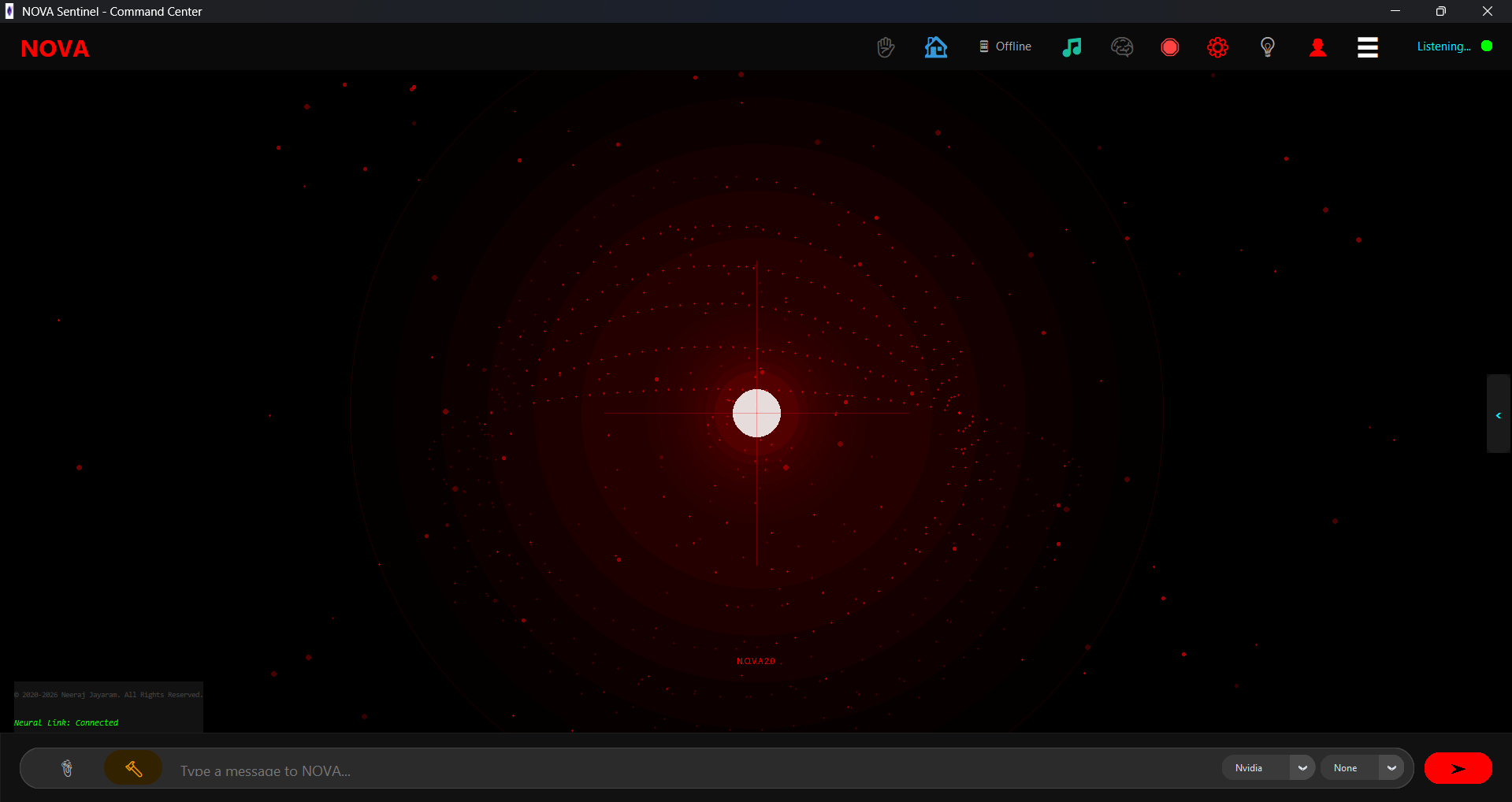
Renders a central 3D wireframe orb surrounded by rotating particle shells, inclination rings, and pulsar light flares. When switching operational modes, the core smoothly morphs colors — Cyan for Listening, Purple for Thinking, Orange for Speaking — and accelerates spin velocity.
4-Orb Holographic AR Grid Canvas
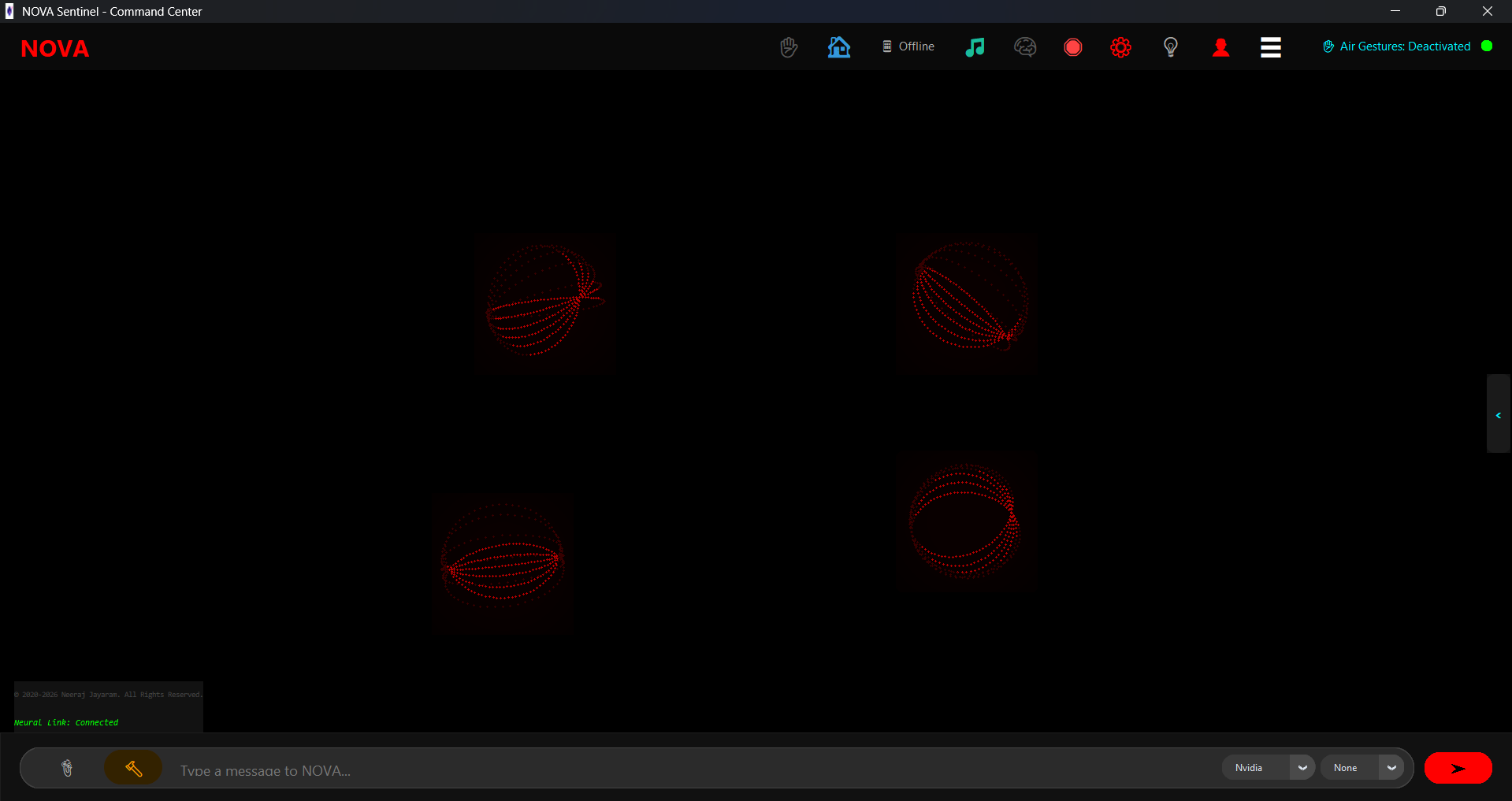
Introduces a 4-Orb Holographic AR Grid — four distinct 3D wireframe spinning orbs centered within the screen. Users can grab individual orbs using index-thumb pinch gestures, drag them in real-time, or trigger two-hand gather/scatter physical impulses.
Particle Nebula Engine & Cyberpunk Humanoid Avatar
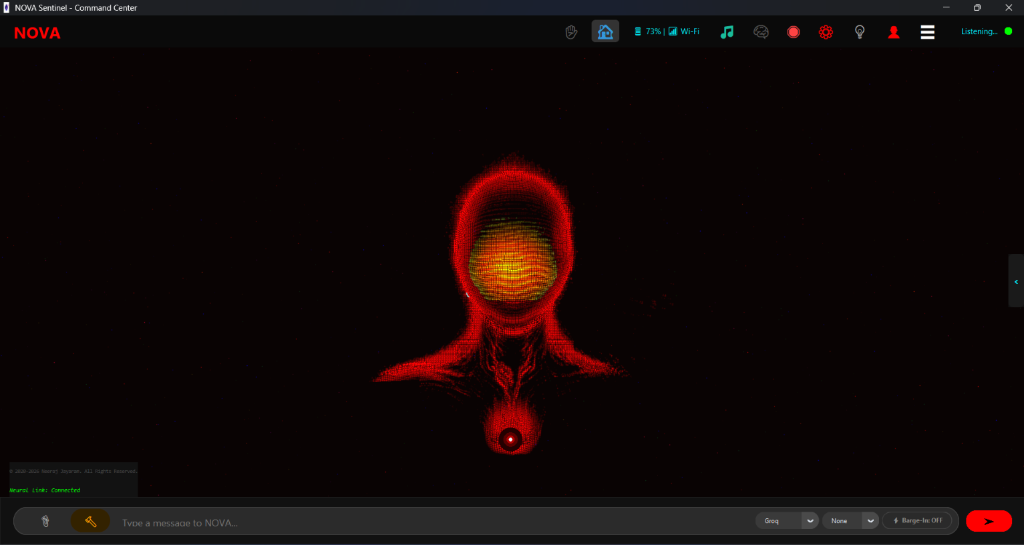
The pinnacle of N.O.V.A.'s visual intelligence. Renders an interactive simulation of over 99,000 active 3D particle nodes forming an illuminated cyberpunk humanoid avatar. Features a glowing crimson particle aura, energetic illuminated chest core, and dynamic golden holographic visor scanlines. The particle swarm exhibits audio-reactive breathing oscillations and luminous resonance pulses whenever voice synthesis is active.
The 3 Cognitive Pillars of N.O.V.A.
Traditional AI assistants are brittle: they crash when scripts fail, suffer total amnesia across sessions, and break when encountering an unscripted intent. N.O.V.A. is engineered on 3 Metacognitive Pillars for complete autonomous resilience.
Self-Healing Execution Sandbox
Autonomous Code Interception & AST Sandbox
Autonomous error interception and real-time AST repair engine. When a 3D simulation, Blender modeling script, or custom tool encounters runtime exceptions or syntax bugs, N.O.V.A. traps the traceback, prompts the AI to synthesize a surgical patch, validates the AST tree, and re-executes automatically up to 5 iterations with zero user intervention.
Feed a broken 3D or graphical script with syntax errors → N.O.V.A. intercepts the crash, applies the patch, and re-runs the scene smoothly.
Living Memory & Cognitive Graph
Temporal Knowledge Graph & Episodic Recall
Cross-session persistent semantic knowledge graph. Connects isolated user facts, life events, project references, and skill usage statistics into a unified relational graph backed by local relational storage and high-dimensional vector embeddings. Eliminates context amnesia, allowing N.O.V.A. to remember relationships and preferences indefinitely.
Share personal preferences or project goals → Return days later → N.O.V.A. recalls your exact relational context in conversation and morning briefings.
Tool Genesis & Skill Loader
On-Demand Skill Synthesis & Dynamic Hot-Reload
Autonomous on-demand capability synthesis via adaptive intent resolution. When a spoken query has no predefined command handler, N.O.V.A. autonomously architects a custom execution module, validates it through the Self-Healing Sandbox, and hot-reloads it directly into active memory. Future requests execute instantly from cache with 0ms LLM latency.
Ask "Calculate the moon phase for tonight" → N.O.V.A. synthesizes the tool, runs it, answers you, and saves it for instant zero-generation recall.
6 Specialized Intelligence Engines & OpenRouter Vault
Groq GPT-OSS 120B
Primary ultra-scale brain delivering rapid reasoning and voice responses, backed by Qwen 3.6 27B and LLaMA 3.3 70B fallbacks.
Nvidia Nemotron
Deep reasoning engine for complex logic, multi-step code execution, and structured problem solving.
Gemini 2.5 Flash
High-capacity vision and multimodal model analyzing screenshots, document scans, and dense research datasets.
Gemini 2.5 Lite
Lightweight high-speed backup engine optimized for instant web search, news aggregation, and rapid context fetching.
Gemma 4 Local
On-device local LLM execution ensuring privacy, offline voice actions, and network resilience.
OpenRouter Free-Model Router
Autonomous multi-model fallback chain routing queries across 20+ free OpenRouter models (Mistral, Qwen, LLaMA 3, DeepSeek) with direct API key vault setup.
Get OpenRouter Key ➔Wi-Fi Trackpad & Gyroscope Air Mouse
Your Android phone becomes a full-featured wireless precision mouse — operating entirely over local Wi-Fi with no cables, dongles, or Bluetooth pairing required.
Precision Touch Trackpad
The phone screen acts as a large-surface trackpad. Drag your finger to move the cursor with sub-pixel accuracy. Tap for left click. A dedicated sub-pixel accumulator ensures smooth, drift-free movement across any resolution.
Gyroscope Air Mouse
Tilt the phone to aim the cursor — like a TV remote for your PC. Uses the phone's hardware gyroscope at maximum sensor rate (100–200 Hz) for ultra-responsive, lag-free aerial pointing.
Volume Button Click Intercept
Hardware volume buttons are intercepted at the native Android kernel level — Volume Down → Left Click, Volume Up → Right Click. No accidental media volume changes, works in both trackpad and air mouse modes.
Local UDP Discovery & Stream
The phone auto-discovers the PC on the local network via UDP broadcast on port 8766. Mouse movement packets stream at high frequency on port 8765 — instant setup, no config required.
N.O.V.A. Workflow & Macro Builder Studio
Chain any combination of N.O.V.A. commands into named automation sequences. Save them, trigger them by voice, and build an ever-growing personal automation library.
Multi-Step Command Chaining
Combine any sequence of intents — open apps, run scripts, send messages, control smart bulbs, take screenshots — into a single named macro that executes with one voice command.
Persistent Workflow Library
Workflows are saved persistently and survive restarts. View, edit, rename, or delete any workflow from the dedicated Workflow Manager interface. Build your personal automation library over time.
Voice-Triggered Execution
Trigger any saved workflow with a simple voice command: "Run my morning routine" or "Execute work mode". The NLU engine maps your natural speech to the correct macro automatically.
Gesture Designer & Recognition Studio
Design and record custom hand gesture patterns in the live recognition studio. Map any user-defined gesture to a workflow, macro, or individual intent for a fully touch-free control experience.
Lockscreen Remote & FullScreenIntent Architecture
⚡ Hands-Free Lockscreen Override
Standard Android 10+ background activity restrictions block apps from opening new screens from the background.
N.O.V.A. overcomes this with a native High-Priority FullScreenIntent Engine (CATEGORY_CALL / IMPORTANCE_HIGH).
- Zero-Touch Lockscreen Waking:
showWhenLockedandturnScreenOnflags illuminate physical display instantly. - Bluetooth Extend Unlock (Smart Lock): Windows PC Bluetooth pairing keeps device security unlocked hands-free when near your desk.
- Multi-Tier
getUserUidResolution: Multi-stage native auth fallback ensures 100% notification delivery without server locks.
FullScreenIntent Trigger
FCM push messages trigger high-priority notification channels that force MainActivity to launch directly over the lockscreen hands-free.
Bluetooth Smart Lock
Pairs phone with Windows PC as a Trusted Device. Keeps home screen unlocked without PIN prompts whenever you are at your computer.
Intent Protection Shield
PC HYBRIDGUARD_BYPASS_INTENTS isolates mobile triggers, ensuring voice commands never launch PC desktop tools by mistake.
Universal 13-Step Setup Wizard
📱 Step 13 of 13: Mobile Companion Setup Checklist
Embedded directly inside N.O.V.A.'s PC installer, Step 13 guides you through complete cross-device configuration for any Android phone.
Install & Pair
Install APK, log in with account email or scan Step 11 QR Code, allow Phone/SMS/Contacts runtime permissions.
Extend Unlock (Smart Lock)
Pair PC & Phone via Windows Bluetooth, add PC as Trusted Device in Android Security & Privacy.
Notification Access
Enable Special Access → Notification access for live PC Toast mirroring of WhatsApp, SMS, and Calls.
Appear on Top & Battery
Grant Appear on Top permission and select Battery → Unrestricted to prevent background service termination.
OEM Reliability Pro-Tips
Enable Auto-Start (Xiaomi/Vivo/Oppo/Realme), turn OFF 'Pause app activity if unused' (Android 12+), and allow Background Data.
🔑 Direct API Key Vault Links
Step 7 of the wizard provides direct one-click browser links to generate and ingest all required AI API keys:
Enterprise Security & Performance
🔐 Account Isolation & Security Architecture
N.O.V.A. enforces strict multi-tenant account isolation. Every account maintains an independent, sandboxed preference store, encrypted credential vault, isolated vector memory collection, and individual persona facts. Switching accounts automatically re-initializes memory without data leakage.
🖥️ Operating System & Hardware Requirements
- Operating System: Windows 10/11 (64-bit)
- Python Environment: Python 3.10 / 3.11 with Virtual Environment
- Dependencies: CustomTkinter, OpenCV 4.13, MediaPipe 0.10.9, Pillow, ReportLab, PyTesseract
- Hardware: Quad-core CPU, 8GB+ RAM, Standard HD Webcam for gesture tracking
N.O.V.A. Companion Android App
Notification Mirroring
Incoming phone calls, WhatsApp messages, and app notifications mirror live into N.O.V.A.'s desktop HUD in real time.
Cross-Device Clipboard Mirror
Copy text, links, or code snippets on your Android phone and paste them instantly on your PC — and vice versa — via real-time encrypted sync.
Wireless File Drop
Send documents, photos, and camera captures directly from your phone into N.O.V.A.'s vault over local Wi-Fi. Zero USB cables required.
Wi-Fi Trackpad & Air Mouse
Use your phone as a precision wireless PC mouse. Touch trackpad mode or gyroscope air mouse mode — volume buttons for left/right click. Instant auto-discovery over local UDP.
Live GPS Location Sharing
Phone continuously broadcasts real-time GPS coordinates to N.O.V.A. on the PC. Ask "Where am I?" and NOVA reads your live location accurately.
Lockscreen Remote & FullScreenIntent
N.O.V.A. pushes high-priority FCM payloads that wake the phone screen and launch YouTube, ring alarms, or trigger actions — all without touching the phone.
Download Official PDF Documentation
NEXT-GEN OPTIMAL VOICE ASSISTANT (N.O.V.A.) System Manual
The comprehensive technical specification document containing full architectural diagrams, API schemas, intent handler references, multi-brain benchmark metrics, and security audit guides.
Download Official PDF ReportN.O.V.A. Manual
PDF Format • 52 Pages • 36 Sections • Updated 2026